Transitioning to a healthier, more productive routine often means working while you walk. A treadmill laptop stand creates a stable workstation that keeps your devices within reach without compromising safety or exercise form. This guide highlights five popular options, comparing build quality, adjustability, and compatibility so you can choose the right fit for your treadmill and desk needs.
Summary Of Selected Products
| Product | Brand | Key Feature | Max Weight | Handlebar Compatibility |
|---|---|---|---|---|
| INMAKER Treadmill Desk Attachment (Basic Version) | INMAKER | Full metal structure, adjustable height/angle | Up to 10 lbs | Handles 1.2″-2.75″ round or 0″-2.75″ flat |
| VIVO Universal Wooden Laptop Treadmill Desk | VIVO | Wood tray with adjustable width; includes mouse pad | Up to 8.8 lbs | 31.2″ to 45.2″ width |
| Miden Treadmill Desk Attachment | Miden | 36″ x 15.4″ desk; tablet holder; edge guard | Up to 22 lbs | Flat treadmills up to 33″; up to 36″ long tray |
| Qsxou Treadmill Desk Attachment 36 Inches | Qsxou | Cup holders and edge protector; cooling holes | Up to 22 lbs | Fits 25″ to 32″ handlebar distance |
| nexanic Treadmill Laptop Desk | nexanic | Cup holder; tablet/phone holder | Up to 22 lbs | Fits 25″ to 32″ handlebars |
INMAKER Treadmill Desk Attachment (Basic)

The INMAKER basic treadmill desk attachment combines a compact metal frame with a stable mounting approach designed for walking workouts. It supports laptops and tablets up to 10 lbs and offers adjustable height and angle to align with different postures. Its universal U-shaped clips fit round (1.2″-2.75″) and flat (0″-2.75″) handlebars, while a slim crossbar increases usable surface without impeding motion. Folding the tray clears the running space, making it a practical choice for compact home gyms.
INMAKER Treadmill Desk Attachment (Black)

This version emphasizes a full metal construction for durability and a secure fit with universal mounting. It supports up to 10 lbs for laptops or tablets and offers height and angle adjustments for better neck and spine alignment during virtual meetings, emails, or video viewing. The design uses metal U-clips and a slim crossbar to maximize usable surface without interfering with your stride.
Miden Treadmill Desk Attachment
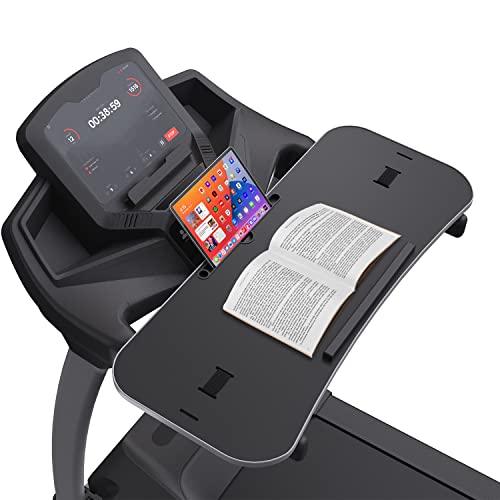
The Miden desk is a larger ergonomic platform designed for bigger work surfaces, with a 36″ x 15.4″ tray and edge guard. It includes a tablet holder and supports up to 22 lbs, making it suitable for heavier laptops or multiple devices. It is compatible with flat treadmills up to 33″ and can extend to 36″ in length, offering substantial workspace for multitasking during workouts.
Qsxou Treadmill Desk Attachment

The Qsxou design focuses on space and stability, with two cup holders, a tablet/phone holder, and an edge protector. It supports up to 22 lbs and fits treadmill handlebars spaced 25″ to 32″. The platform is sized to provide a broad workspace while protecting devices from impact during walking sessions. A reinforced edge and non-slip features help keep equipment secure while in use.
nexanic Treadmill Laptop Desk

The nexanic platform provides a universal 35.4” x 15.7” workspace with cup, tablet, and phone holders. It supports handlebars from 25″ to 32″ and emphasizes secure, versatile use for laptops and tablets while walking. Reviewers note its capability to hold essential devices securely during longer workouts and work sessions, making it a balanced option for multitasking on the move.
Buying Guide: Key Purchase Considerations
- Fit and compatibility: Measure your treadmill’s handlebar distance and ensure the stand’s adjustable width or clamps will align with your model. Look for universal mounting or adjustable clamps for broader compatibility.
- Weight capacity: Consider the weight of your laptop or tablet. Many stands support between 8.8 and 22 lbs; heavier devices may require sturdier, metal constructions.
- Surface area: Choose a tray size that accommodates your devices plus a mouse or cup, especially if you multitask. Larger desks reduce the need for constant rearranging.
- Adjustability: Height and angle flexibility helps maintain ergonomic posture. A stand that tilts and raises easily reduces neck and back strain during long sessions.
- Stability and protection: Look for non-slip surfaces, edge guards, and protective padding to prevent device damage while walking.
- Portability and footprint: If you have limited room, select a compact unit that folds or folds away easily when not in use.
- Durability: Full-metal constructions typically offer greater longevity under regular movement and vibrations than plastic, lighter-duty options.
- Ease of installation: Prioritize designs with simple mounting that doesn’t require specialized tools or treadmill modifications.
- Accessory inclusion: Some models add mouse pads, wrist rests, or extra straps to secure devices; consider whether these complements align with your workflow.
- Warranty and support: Check return policies and manufacturer support in case mounting needs adjustment or replacement parts are required.
Multiple perspectives help you choose between larger, more robust desks and lighter, easier-to-mount options. If you value maximal workspace and heavier device support, a larger wooden or metal platform may be best. If you prioritize space savings and quick setup, a compact universal attachment with foldable surfaces could be preferable.